Interaction Challenge System
Elys Awareness keeps interaction rules, challenge mechanics, and presentation separate. UERPInteractionChallenge owns the mechanic, UERPInteractionComponent owns the attempt lifecycle, and a Widget Blueprint owns the visual treatment. A project may use the bundled UI, replace one widget, or disable automatic challenge UI and route the events into its own HUD.
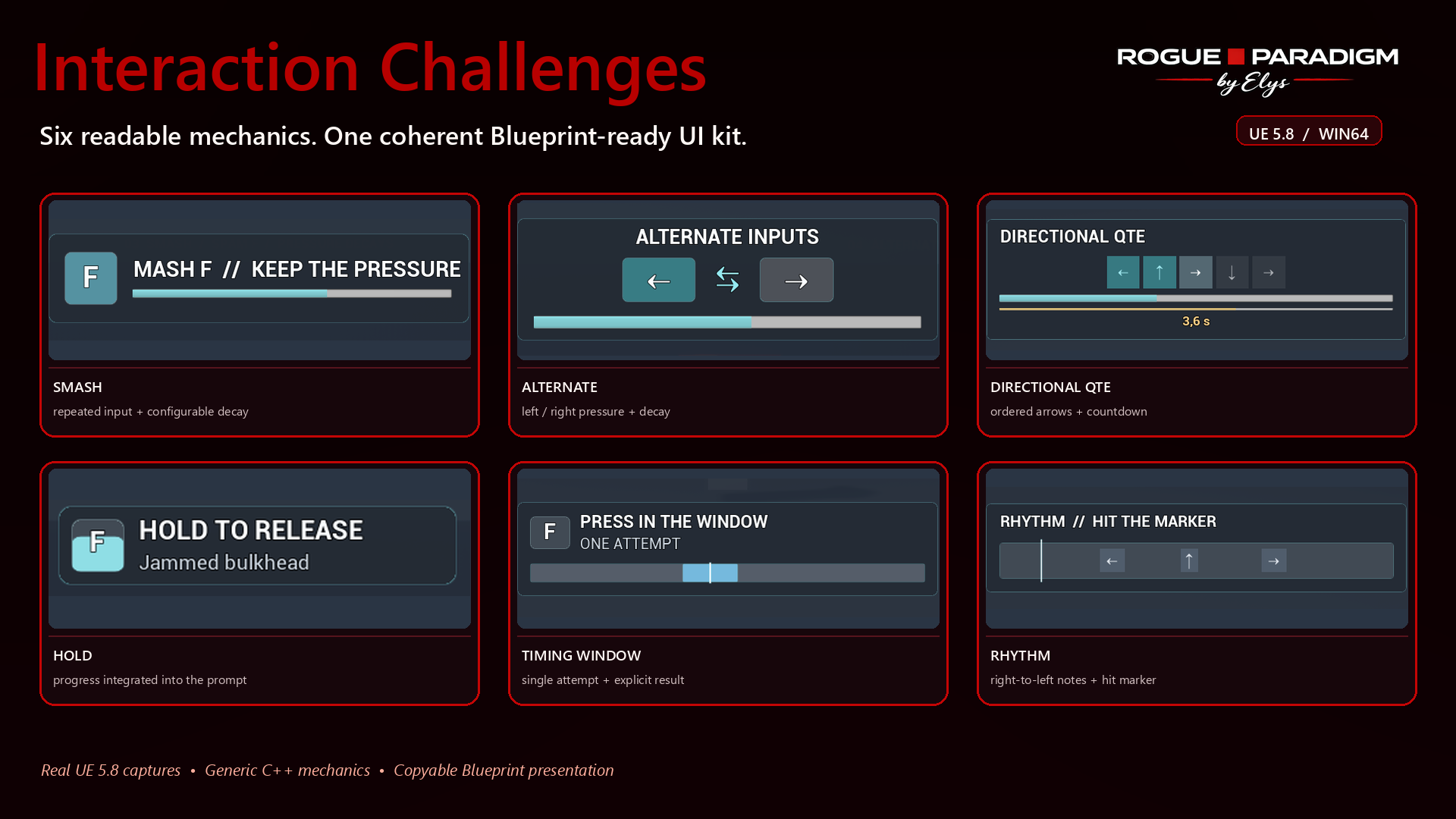
Which challenges belong in the core plugin?
The core includes short, reusable interaction checks rather than game-specific mini-games:
| Mechanic | Runtime class | Default presentation | Best use |
|---|---|---|---|
| Hold | UERPHoldChallenge | Inside the interaction prompt | Deliberate confirmation, heavy lever, revive |
| Mash / pressure | UERPMultiPressChallenge | Center-screen overlay | Force a jammed object, resist pressure |
| Alternate | UERPAlternatingPressChallenge | Center-screen overlay | Pumping, sawing, balancing force |
| Directional QTE | UERPSequenceChallenge | Center-screen overlay | Short ordered input sequence |
| Timing window | UERPTimingChallenge | Center-screen overlay | Single or staged precision checks |
| Rhythm | UERPRhythmChallenge | Center-screen overlay | Short right-to-left beat sequence |
UERPTimedPressChallenge remains available for compatibility and genuine reaction deadlines, but the showroom does not use it as a filler mechanic.
Full lock-picking, fishing, hacking, or other multi-rule activities should ship as separate plugins or add-ons. They can integrate manually by subclassing UERPInteractionChallenge, assigning a Widget Blueprint, and completing through OnProgress and OnComplete; neither plugin needs to depend on the other.
Server-authoritative challenges
In a network game, UERPInteractionComponent creates an independent challenge instance on the server. The server starts and ticks that instance, accepts only declared input transitions and decides success or failure. A client-side FinishChallenge(true) cannot authorize an interaction. The instant-action RPC also refuses actions that require a challenge.
Each attempt has an increasing identifier and is bound to its target, action and challenge definition. Replayed identifiers and messages for old attempts cannot complete a new attempt. Changing focus cancels the attempt; the server also checks range, eligibility, filters and action identity during the attempt and before execution. MaxServerChallengeDuration bounds abandoned attempts (120 seconds by default). Duplicate key-down messages do not count as additional presses, and an attempt accepts at most 120 input transitions per server second.
The client keeps a separate presentation instance so the widgets remain responsive. Its predicted result waits for the server result before the interaction component reports success. Server challenge progress is not broadcast to other players. Gameplay effects and any shared challenge display are the project's replication responsibility.
Custom Blueprint challenges
- Keep the mechanic in the challenge Blueprint's
StartChallenge, input andTickChallengeevents. CallReportProgress,ReportStepandFinishChallengefrom this mechanic. Widgets should display it rather than decide gameplay success. - The primary interaction input is allowed automatically. Add custom inputs to
AdditionalInputActions, or overrideGetAdditionalInputActions. Sequence, alternating and rhythm classes include their configured inputs automatically. Route both pressed and released events into the interaction component. bIsAuthoritativeAttemptis true on the server and in standalone, false on the client's presentation instance.GetWorldresolves through the component. Avoid UI, local-player or viewport dependencies in authoritative mechanic code.- Use the same deterministic configuration on both instances. Project-specific random challenges need a shared seed/configuration supplied by the project; arbitrary Blueprint state is not automatically synchronized.
- Time is measured on the server when messages arrive. Client timestamps are not accepted, and this implementation does not perform latency rewind. Test and tune narrow timing windows for the latency expected in your game. Custom latency compensation belongs in the mechanic's explicit server validation policy.
The built-in hold, mash, alternating, sequence, timed-press, timing and rhythm mechanics use this same server lifecycle. Input validation verifies the game rules; it cannot prove that a physical keyboard produced an input.
Presentation modes
PresentationMode selects where the challenge appears:
InteractionPrompt: progress remains attached to the focused object. This is the recommended mode for hold interactions.ScreenOverlay: the world prompt is hidden and a modal widget is placed near screen center. This is the recommended mode for QTEs, timing, mash, alternating, and rhythm challenges.
The component exposes ChallengeWidgetAnchors, ChallengeWidgetPosition, ChallengeWidgetAlignment, ChallengeWidgetZOrder, and ChallengeResultDisplayDuration. These values are Blueprint-editable and avoid hard-coding the UI to the upper-left corner or to one resolution.
Input routing
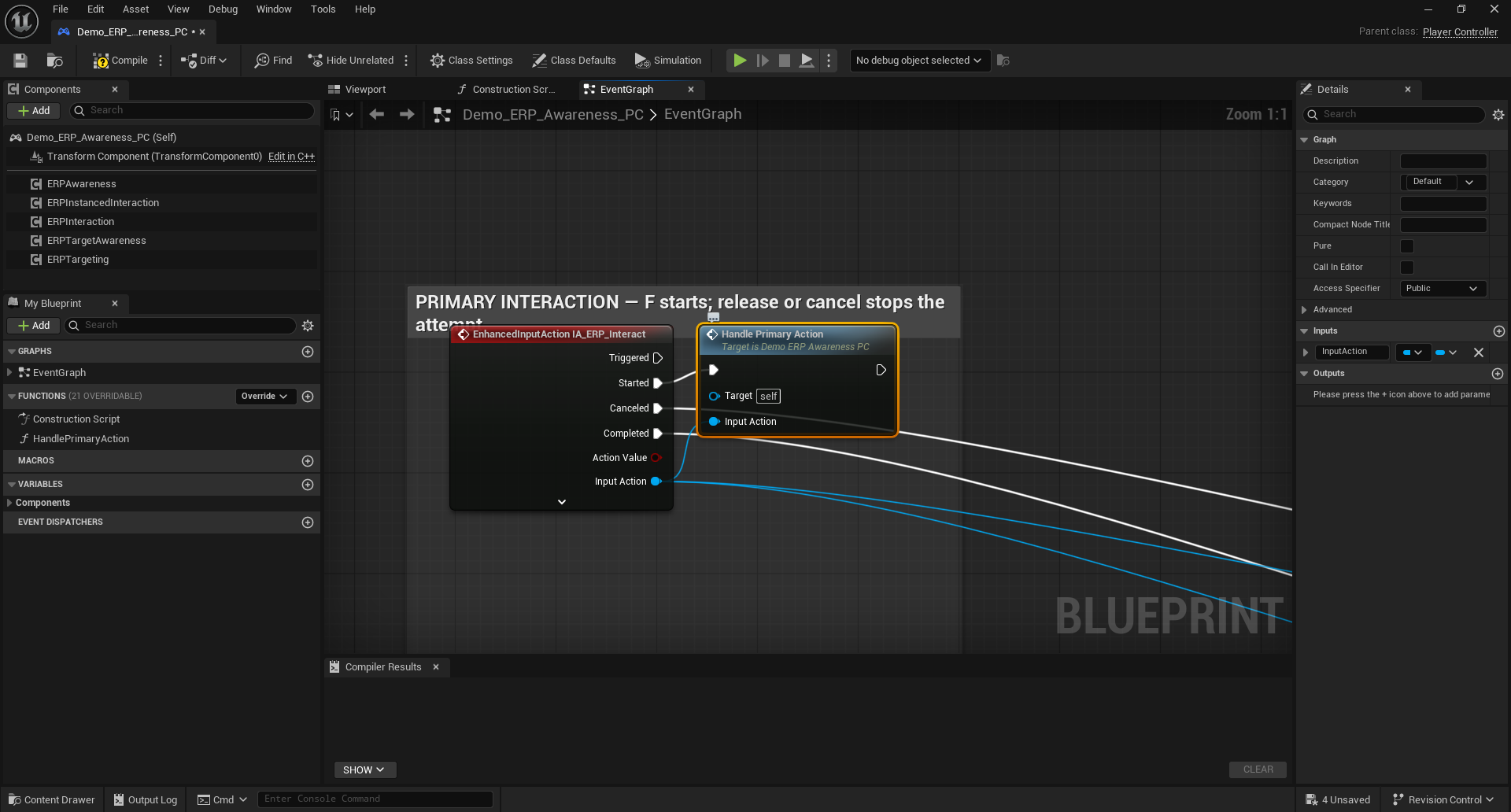
Every Enhanced Input action used by a challenge must reach the same interaction component:
Enhanced Input Started
  -> ERPInteraction.StartInteractionAttempt(Input Action)

Enhanced Input Completed/Canceled
  -> ERPInteraction.StopInteractionAttempt(Input Action)
The component forwards the actual UInputAction to the active challenge. This is required for alternating and directional challenges; sending only a generic "pressed" signal cannot distinguish Left from Right or validate a QTE sequence.
The demo PlayerController keeps this routing in named, commented blocks:
Modal input suppression
Directional inputs frequently share WASD, ZQSD, arrow keys, or a gamepad stick with movement. While a ScreenOverlay challenge is active, bSuppressMovementInputDuringScreenChallenges prevents the pawn from moving. bSuppressLookInputDuringScreenChallenges can also suppress camera input. Existing controller ignore-input state is preserved and restored when the challenge closes.
Difficulty and accessibility
Difficulty belongs to the challenge object, not the widget:
- Mash:
RequiredPresses,PressCooldown,DecayPerSecond. - Alternate:
RequiredInputs,PressCooldown,DecayPerSecond,bStartWithLeft. - QTE:
Sequence,TimeLimit,bFailOnWrongKey. - Timing: cursor speed, target window, fail-on-miss, target sequence, and speed increase.
- Rhythm: beat actions, beat interval, approach duration, and hit window.
UERPMultiPressChallenge::InputMode also supports a hold alternative and automatic completion. This lets an accessibility menu replace rapid repeated input without rewriting the interaction.
The supplied direction widgets use arrows rather than physical letter labels, so AZERTY, QWERTY, gamepad, and remapped controls remain visually coherent. Projects that display actual bindings should resolve the current Enhanced Input mapping at runtime.
Events for custom HUDs
All challenges expose:
OnProgress(float Progress)OnComplete(bool bSuccess)OnStepChanged(int32 CurrentStepIndex, int32 TotalSteps)for stepped challenges
Directional QTEs additionally expose OnCountdownChanged(RemainingSeconds, NormalizedRemaining). The rhythm and sequence implementations publish their active step so a custom HUD, sound layer, or animation Blueprint can react without reading widget state.
Disable bAutoCreateChallengeWidget on UERPInteractionComponent when your project owns the challenge HUD. Bind to the component's OnInteractionProgress and to the runtime challenge events instead.
Creating a separate mini-game add-on
- Create a class derived from
UERPInteractionChallengein the add-on plugin. - Override
StartChallenge, input handlers,TickChallenge, andResetas needed. - Call
ReportProgress/ReportStepfrom Blueprint andFinishChallenge(bool)for one final result.ReportProgressdoes not imply completion unlessCompleteAtOneis enabled. - Create a Widget Blueprint derived from
UERPChallengeWidgetBasein the add-on. - Assign that widget class on the challenge object.
- In the host project, place the challenge in an interaction descriptor.
This is a manual integration point, not a plugin dependency. Elys Awareness does not reference the add-on, and the add-on may remain independently usable.
See Learn by Composition for the Blueprint-only two-stage example and the reset/retry lifecycle.
Verification checklist
- The challenge opens in the intended presentation mode.
- The world prompt is restored after success, failure, or cancellation.
- Movement and look suppression return to their previous state.
- Failure prevents interaction execution.
- Progress resets before the next attempt.
- QTE and rhythm step events report zero-based indices and finish at
TotalSteps. - The UI remains readable at the project's smallest supported viewport and couch distance.