Setup Guide
Goal: working microphone transcription in about five minutes.
1. Enable the plugin
Elys Listen is awaiting Fab approval. These installation steps apply after publication; see the product page for release status.
Once published and installed from Fab, open Edit → Plugins, find Elys Listen under Audio, make sure it is enabled, and restart the editor if prompted.
2. Download a Whisper model
Open Window → Rogue Paradigm → Elys Listen Model Manager. You can also open Project Settings → Plugins → Elys Listen (STT) and select Manage Models.... Pick a model:
| Model | Size | Notes |
|---|---|---|
tiny / base | 75–142 MB | Fast, good for testing |
small | 466 MB | Recommended balance of speed/accuracy |
medium / large | 1.5–3 GB | Best accuracy, heavier |
Models download to Content/ElysListen/Models/. When a download finishes,
the plugin auto-configures the model path for you.
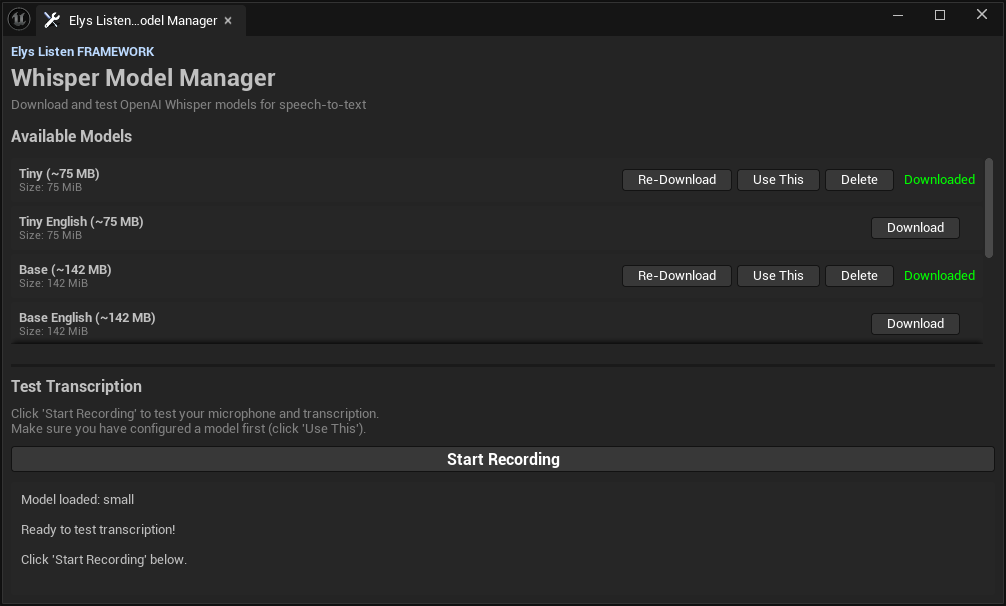
The Model Manager downloads, activates, removes, and tests local Whisper models without leaving Unreal Editor. Click the image to view it at full size.
3. Configure settings
In Project Settings → Plugins → Elys Listen (STT):
- Enable STT: on
- STT Backend:
Whisper (Local) - STT Model Path: set automatically by the downloader (or browse to a
.bin) - Default Language Code:
autofor multilingual detection, or a fixed code such asen,fr, orja
The active model, backend, language, capture switch, worker count, and model catalog are all available on this single settings page.
4. Start listening
Speech-to-text is a machine-global input, so the primary API is the STT subsystem — no actor needed. Bind On Text and call Start Listening:
// C++
UERP_STTSubsystem* STT = GetGameInstance()->GetSubsystem<UERP_STTSubsystem>();
STT->OnText.AddDynamic(this, &UMyThing::HandleTranscript);  // FString in
STT->StartListening();
In Blueprint: Get Game Instance Subsystem (Elys STT Subsystem) → bind On Text / On STT Result → call Start Listening.
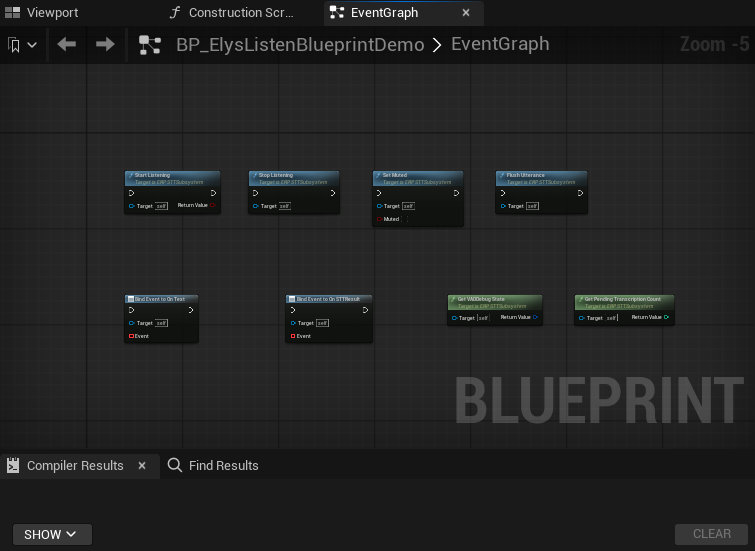
Minimal Blueprint surface: session controls on the first row, transcript events and runtime diagnostics on the second. Click the image to open the complete Blueprint editor capture.
Prefer a component? Add an Elys STT Component to any actor (a PlayerController works well), tick Auto Start Listening, and bind On STT Result / On Text on the component. It just forwards to the subsystem — use whichever style you like.
5. Speak
With the default settings, just talk: the voice activity detector segments your
speech automatically and On STT Result fires after each utterance (about
1.5 s of silence ends one). For push-to-talk instead, set
bUseVoiceActivityDetection = false in the component's Config and call
Flush Transcription when the key is released.
Optional: run the included sample
Enable Show Plugin Content in the Content Browser and open
/ElysListen/Demo/Maps/L_ElysListenGameplay for the player-facing VAD and
push-to-talk experience, or /ElysListen/Demo/Maps/L_ElysListenWorkbench for
the complete acceptance interface. Both let you change language without
restarting the level. The sample GameMode exposes both widget classes, so they
can be swapped for project-specific subclasses.
6. Multiplayer note
STT runs client-side only. Never replicate audio. If the server needs the
text, send the final FERP_STTResult.TranscribedText over an RPC.
Next: read Shipping Your Game before you package. If you also own and install the separate Elys Mind or Elys Speak plugins, see the clearly marked optional suite integration.