Ready-to-use runtime UI
Elys Listen remains usable without any UI, but the plugin also ships a neutral
ElysListenUI runtime module. Its widgets are safe placeholders for prototypes
and shippable projects, and every class can be subclassed in Blueprint when a
project is ready to apply its own art direction.
The UI module depends on ElysListen; the speech-to-text runtime never depends
back on UI code.
Complete control panel
Create an Elys Listen Control Panel (UERP_STTControlPanelWidget) and add it
to the viewport. It resolves the Game Instance STT subsystem automatically and
provides:
- authoritative Ready, Listening, Speech Detected, Transcribing, Muted, and Error states;
- a normalized voice-activity meter;
- start/stop, mute, flush, and clear actions;
- the latest recognized subtitle;
- scrollable transcript history;
- model, worker, latency, and VAD diagnostics.
You can also call BindToSTTSubsystem to inject a specific subsystem explicitly.
Included demo levels
The plugin ships several playable levels. Open them with Show Plugin Content enabled in the Content Browser, then press Play:
| Level | Purpose |
|---|---|
/ElysListen/Demo/Maps/L_ElysListenGameplay | Player-facing VAD and push-to-talk demo with a compact language selector |
/ElysListen/Demo/Maps/L_ElysListenWorkbench | Complete model, language, microphone, VAD, transcript, and diagnostics test |
/ElysListen/Demo/Maps/L_ElysListenWidgetGallery | Visual review of the individual runtime widgets |
/ElysListen/Demo/Maps/L_ElysListenSample | Full acceptance-test composition |
The Gameplay demo defaults to automatic language detection. Its selector can
also force a language while the session is running. Multilingual Whisper models
offer the full language catalog; English-only .en models lock the selector to
English so the UI cannot advertise an unsupported mode.
The level uses AERP_ElysListenDemoGameMode. Its ControlPanelClass and
VoiceOverlayClass properties are replaceable, so the test flow is not tied to
the bundled presentation. It defaults to the Blueprint-ready wrapper assets in
/ElysListen/UI/.
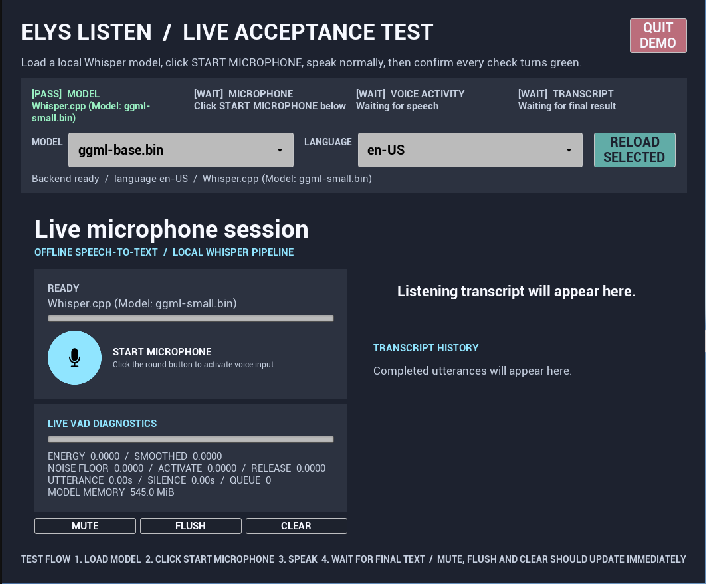
The four checks at the top make it immediately clear whether the model, microphone, VAD, and transcription pipeline are working.
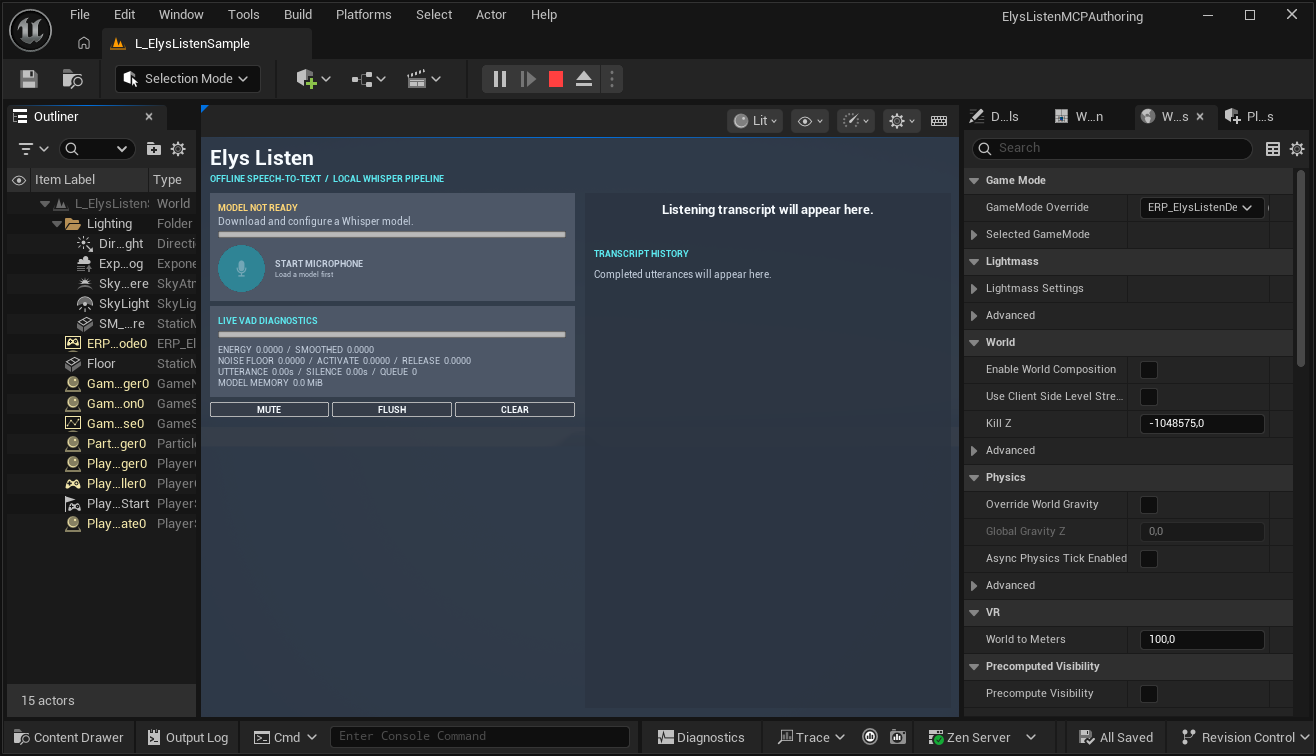
The sample also handles the empty state: before a model is configured, the microphone action is disabled and the UI tells the user what to do. Click the image to see the level and GameMode override in Unreal Editor.
Blueprint widget assets
The plugin includes data-only Widget Blueprint subclasses for every native UI class. They are deliberately thin: runtime behavior stays in C++, while a game can duplicate or derive from these assets to replace visuals safely.
| Asset | Native parent |
|---|---|
WBP_ElysListenControlPanel | UERP_STTControlPanelWidget |
WBP_ElysListenVoiceOverlay | UERP_STTVoiceOverlayWidget |
WBP_ElysListenRecordingIndicator | UERP_STTRecordingIndicatorWidget |
WBP_ElysListenVADWaveform | UERP_STTVADWaveformWidget |
WBP_ElysListenGameplaySubtitle | UERP_STTGameplaySubtitleWidget |
WBP_ElysListenStatus | UERP_STTStatusWidget |
WBP_ElysListenSubtitle | UERP_STTSubtitleWidget |
WBP_ElysListenTranscriptHistory | UERP_STTTranscriptHistoryWidget |
WBP_ElysListenDiagnostics | UERP_STTDiagnosticsWidget |
Individual widgets
| Widget | Intended use |
|---|---|
UERP_STTStatusWidget | Compact HUD microphone button, status, and VAD meter |
UERP_STTSubtitleWidget | Latest final utterance with optional confidence and auto-dismiss |
UERP_STTTranscriptHistoryWidget | Scrollable, bounded utterance history |
UERP_STTDiagnosticsWidget | Developer-facing energy, thresholds, queue, model memory, and errors |
UERP_STTControlPanelWidget | Complete composition of the widgets above |
Player-facing gameplay widgets
The diagnostic widgets are intentionally explicit. For a shipping HUD, use the smaller presentation widgets instead:
| Widget | Intended use |
|---|---|
UERP_STTRecordingIndicatorWidget | Language-neutral microphone privacy indicator using only the microphone icon, state color, and pulse animation |
UERP_STTVADWaveformWidget | Animated equalizer driven by the real normalized VAD energy rather than fabricated audio |
UERP_STTGameplaySubtitleWidget | Bottom-center local-player transcript with optional speaker label, readable timing, wrapping, and fades |
UERP_STTVoiceOverlayWidget | Drop-in full-screen HUD composition of the three gameplay widgets |
The waveform represents the VAD energy envelope, not raw PCM samples. It adds a
small idle motion only while a real listening session is active, then scales and
changes color from the authoritative VAD state. All gameplay widgets are
non-interactive and use HitTestInvisible, so they do not block game input.
The player-facing recording indicator contains no baked-in status text. It uses
the neutral microphone glyph from Resources/Microphone.svg: muted/inactive,
listening, speech detected, processing, and error states are communicated by the
configured style colors, while active capture pulses. This keeps the default HUD
usable in any language. The explicit English labels remain limited to diagnostic
and acceptance-test widgets.
The bundled Whisper backend produces completed utterances only. The default
gameplay subtitle therefore ignores non-final FERP_STTResult values instead of
exposing an interim-results option that the shipped backend cannot exercise.
Styling
Each widget exposes FERP_STTWidgetStyle. It controls the neutral palette,
typography sizes, and spacing without introducing a dependency on another Rogue
Paradigm plugin. Projects may set the style directly or derive Blueprint widget
classes and replace the layout entirely.
The widgets only consume public Elys Listen APIs. Removing or replacing them has
no effect on microphone capture, Whisper inference, or the OnText pipeline.